Skip to content
Todoly

The daily planner for iPhone, iPad and the web

Plan your day. Check it off.

Todoly puts your tasks and events on a calm timeline. You see at a glance what’s up now, where there’s still room and whether you’ve taken on too much.

The app for iPhone, iPad and Apple Watch is coming soon to the App Store

  • Free
  • App without an account
  • No ads
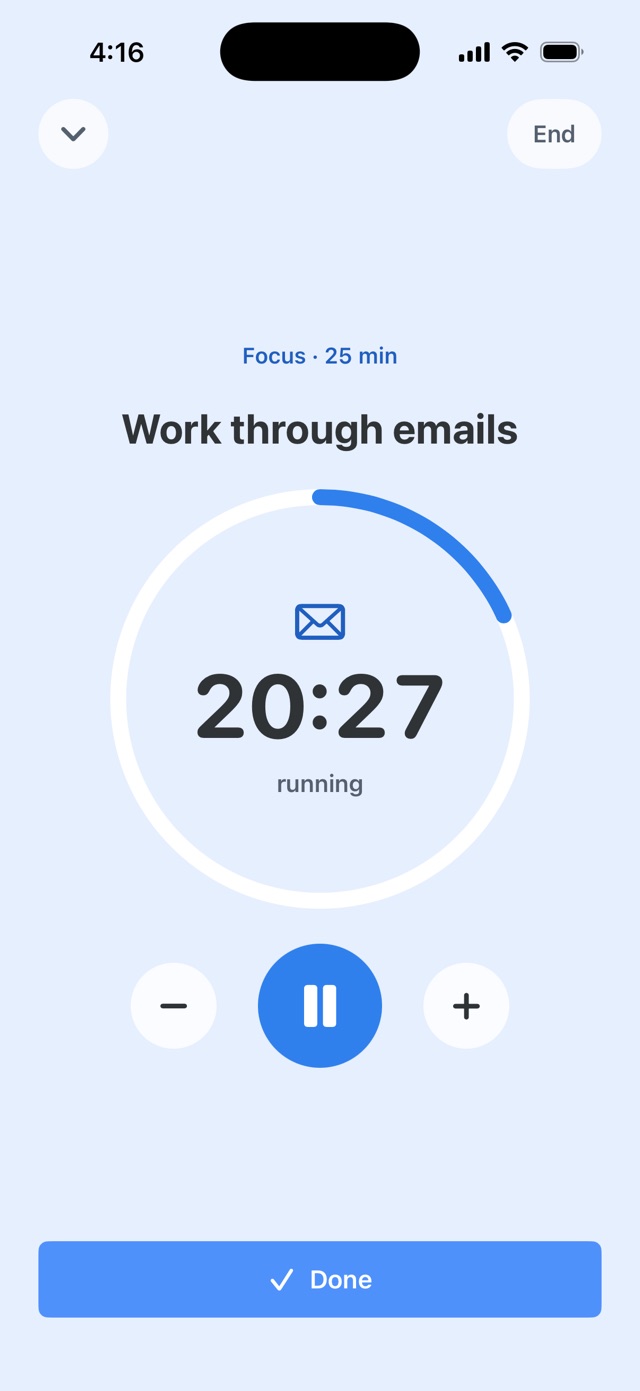
Focus in full screen: “Work through emails”, 20 minutes left in the ring
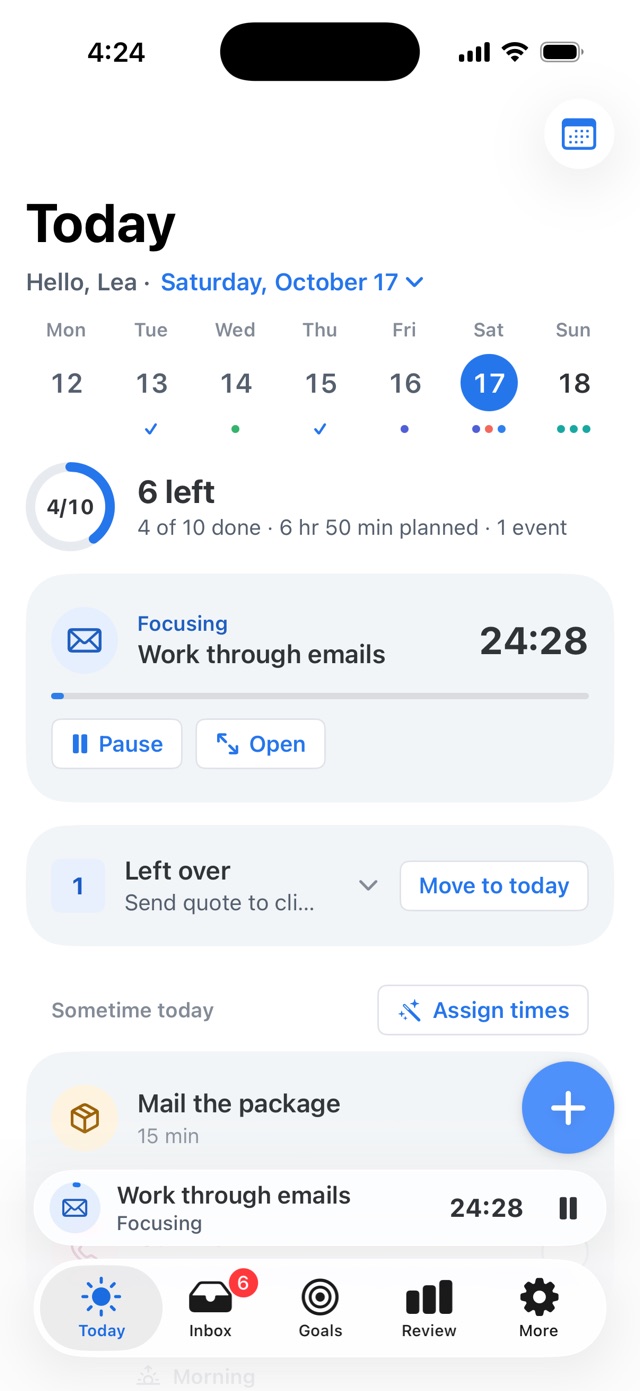
Today in Todoly: the week bar, “6 left”, the running focus timer and tasks without a time

How it works

A day in three steps

  1. 1

    Write it down

    “Dentist tomorrow 10am 45 min”: Todoly recognizes the day, time and duration and puts the task in the right place. Everything else waits in the Inbox.

  2. 2

    Plan your day

    One minute in the morning: bring over leftover tasks, go through the Inbox, apply a template. “Assign times” puts everything into the free gaps.

  3. 3

    Check it off

    With one tap: on your iPhone, in the widget, on your watch or on the Lock Screen. In the evening, Review shows what you got done.

Timeline

Your day as one clear line

Tasks and events line up, each as long as it takes. The “Now” line shows where you are, and free gaps show where there’s still time.

  • Events from your calendars right between your tasks
  • Press and hold, then drag to move a task; drag the bottom of the capsule to change its duration
  • If your day has more planned than there’s time for, Todoly tells you
  • Dots in the week bar show what’s coming up on other days
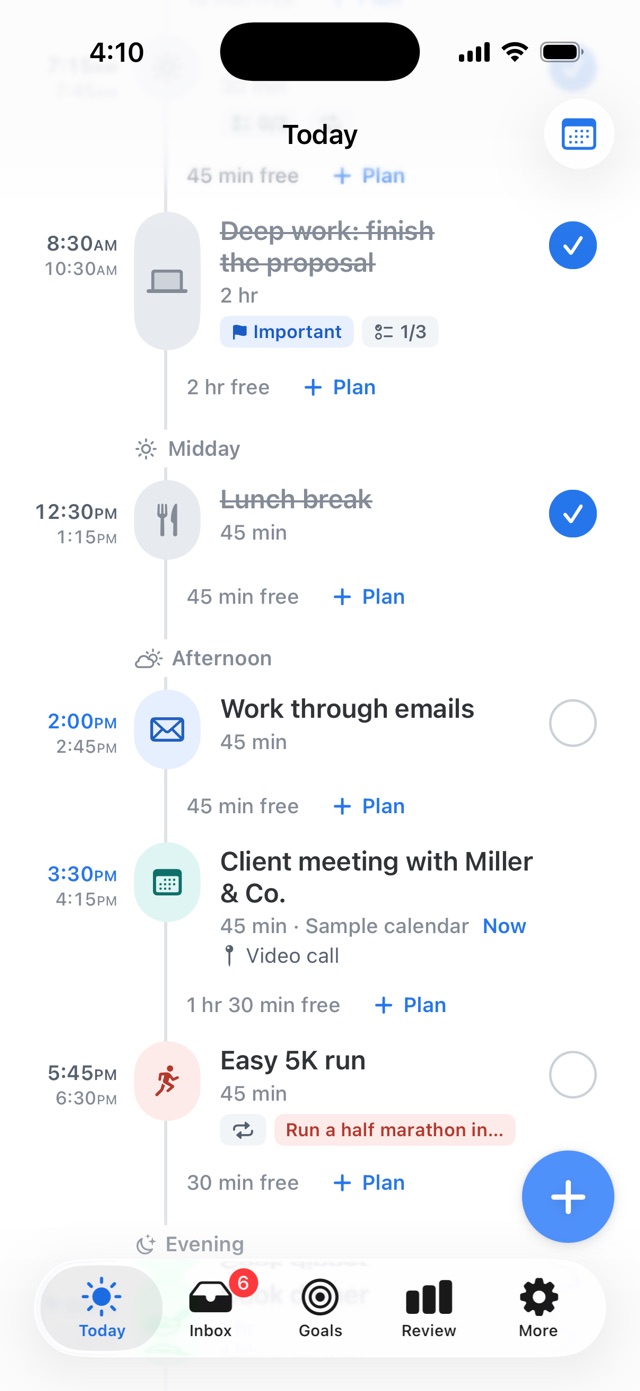
The timeline in the afternoon: “Work through emails”, a client meeting marked “Now” and free gaps for planning

Quick add

Just write it down

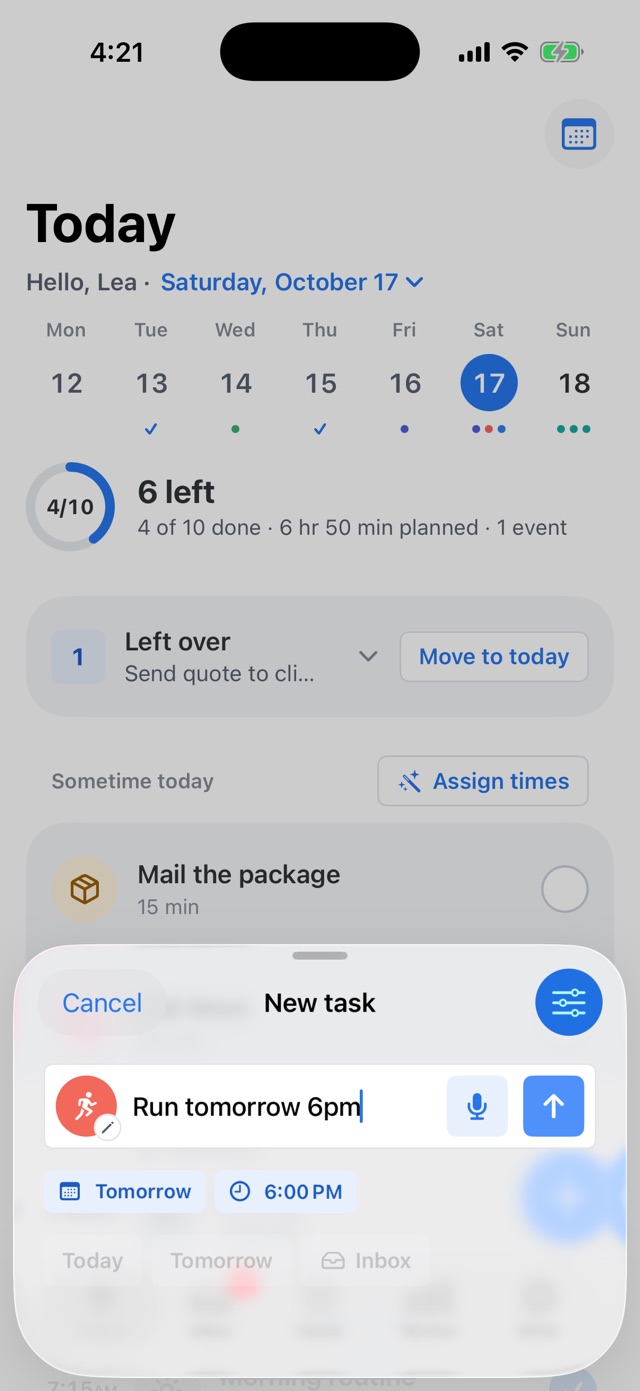
No forms, no picker wheels: type or say what’s coming up, the way you’d tell a person. Todoly understands date, time, duration and repeats, and shows you what it recognized.

  • When: “tomorrow”, “Friday 2pm”, “in 3 days”, “on Dec 24”
  • How long: “45 min”, “1.5 h”, “2 hours”
  • How often: “every Mon and Thu”, “every 2 weeks”, “monthly”
  • Where: #work for the life area, ! for important tasks
  • Or dictate: tap the microphone and start talking; recognition happens on your iPhone
Quick add: “Run tomorrow 6pm” with the recognized details Tomorrow and 6:00 PM, next to it the microphone for dictation

Meetings

Join meetings with one tap

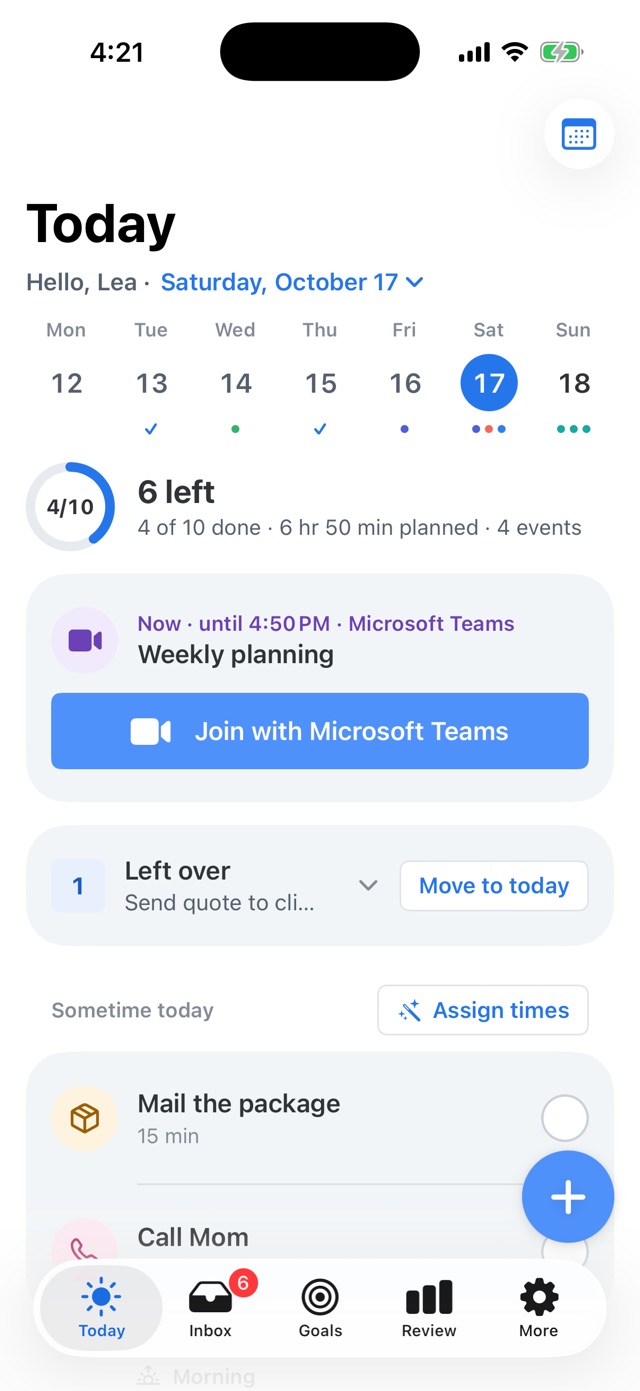
If an event contains a link to Microsoft Teams, Google Meet or Zoom, Todoly recognizes the meeting. Shortly before it starts, it appears at the top of your day with a button to join.

  • Teams, Meet, Zoom, Webex and FaceTime, from your calendars and calendar subscriptions
  • Meeting ID and passcode ready to copy, the invitation tidied up
  • Edit events from your iPhone calendars right in Todoly
  • Move a task you created from one of your own events, and the event moves with it
Today with the “Weekly planning” meeting in progress and the “Join with Microsoft Teams” button

Focus

Focus that stays with you

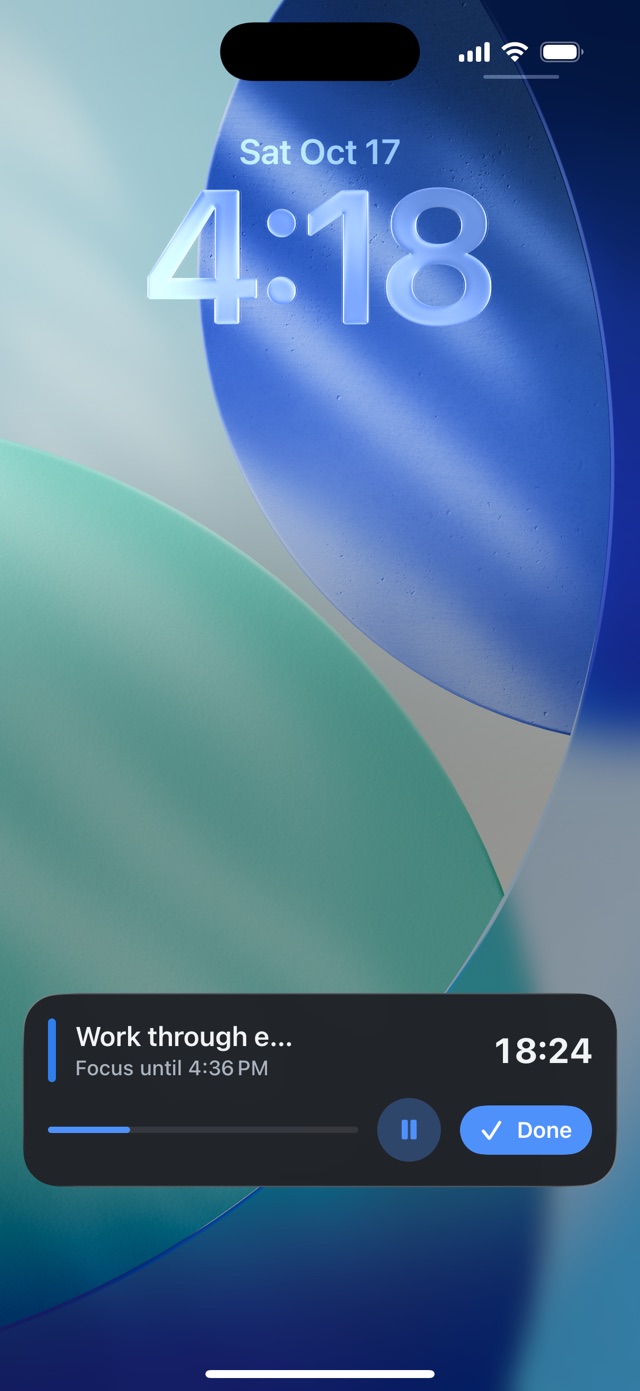
One tap starts the focus timer for the task that’s up now: until it ends or for as long as you like. Minimized, it keeps running as a bar above the tabs, in the Dynamic Island and on the Lock Screen.

  • Time left in a big ring, with subtasks to check off
  • Pause and resume right on the Lock Screen
  • A notification when time is up
  • Focus time shows up in Review
Lock Screen with a Live Activity: focus on “Work through emails” with time left, Pause and Done

Plan your day

Planned in a minute every morning

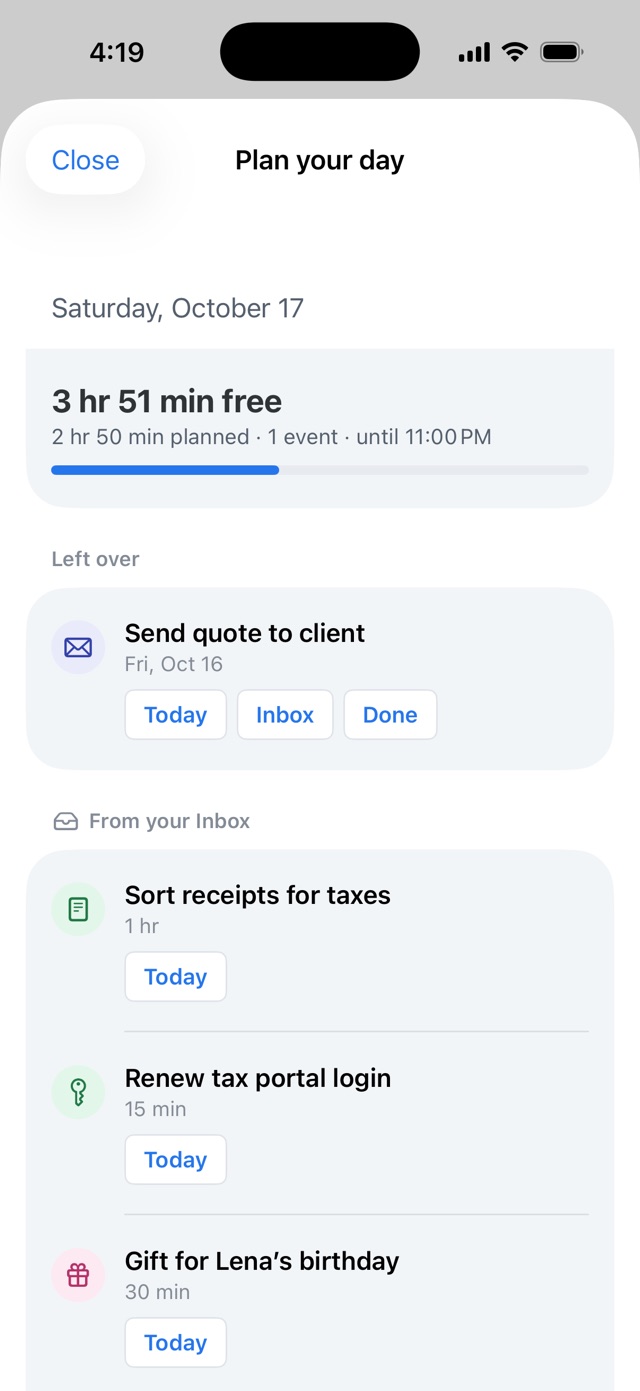
“Plan your day” shows how much free time you have and gathers everything that could be added today. One tap puts tasks without a time into the next free gaps.

  • Move yesterday’s leftover tasks to today with one tap
  • Schedule tasks straight from the Inbox
  • Templates for recurring days, such as “Work from home”
  • Wrap up your day in the evening, with your mood and a short note
Plan your day: 3 hr 51 min free, leftover tasks and tasks from the Inbox

Goals and Review

What it’s all for

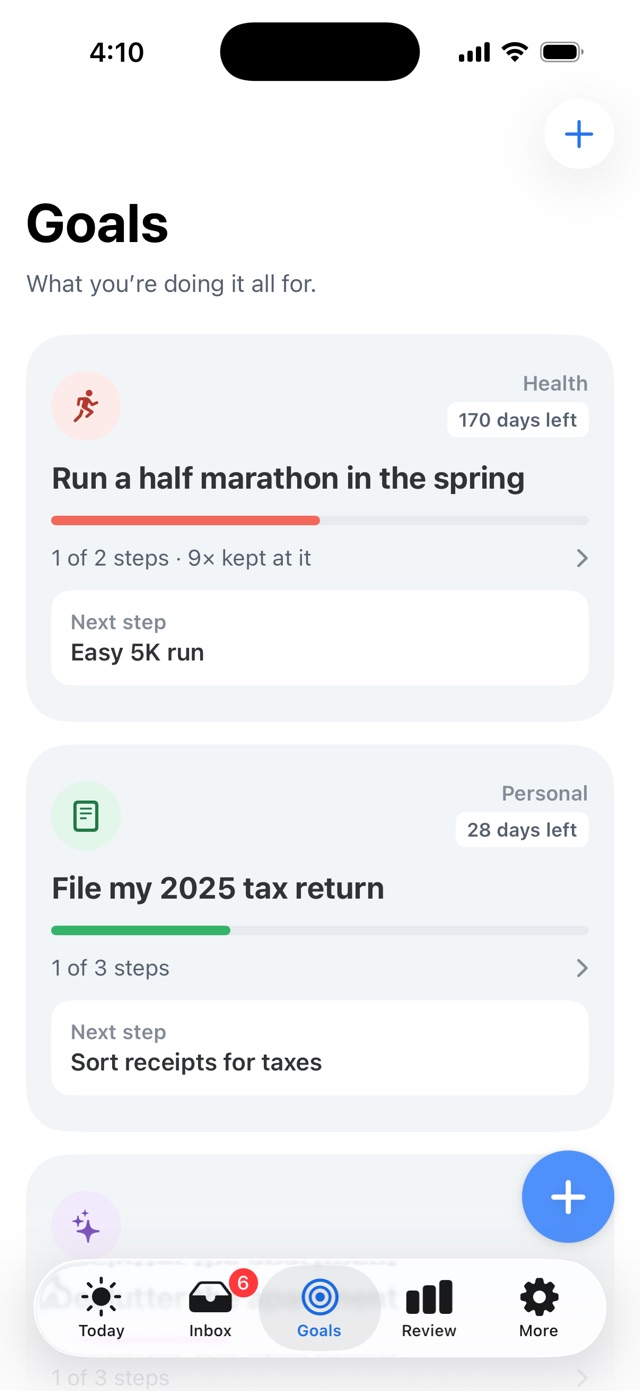
Goals bring together the small steps that lead to something bigger. Review shows what you got done, not what’s missing.

  • Progress and the next step for every goal
  • Life areas such as Work, Health and Home
  • Completed tasks, days in a row and focus time over the past few weeks
  • Time by life area: where did your week go?
Goals with progress bars and the next step

And there’s more

Everything a day needs

  • With your calendar

    iCloud, Google, Outlook and Exchange through your iPhone’s calendars. Events are read on the device and never leave it.

  • Inbox

    Everything that comes to mind, without a date. You can plan it later, with filters for important tasks, goals and areas.

  • Repeats

    Daily, on weekdays, every few weeks or monthly. You can move or skip individual occurrences of a series.

  • Reminders

    Shortly before a task starts and, if you like, every morning to “Plan your day”.

  • Widgets

    Your day on the Home Screen, with a circle to check off tasks right in the widget.

  • Apple Watch

    Your day on your wrist: check off tasks and dictate new ones, plus a complication for your watch face.

  • Siri and Shortcuts

    “New task in Todoly”, “What’s on today?” and “Plan your day”, also from the share sheet in other apps.

  • Light and dark

    Todoly follows your iPhone’s setting or stays the way you choose.

  • On iPad too

    The same app on the big screen: in landscape with the Inbox next to your day, plus keyboard shortcuts.

  • In the browser

    At todoly.de/app, Todoly runs on your computer and on Android, with nothing to install and a free account.

  • Moving from Reminders

    Bring over open tasks from Apple Reminders with one tap.

  • iCloud sync Premium

    Tasks, goals and templates stay the same on iPhone and iPad, in your own iCloud storage.

  • Account sync Premium

    Sign in to your account in the app, and your iPhone, iPad and browser stay in sync.

  • Trello Premium

    Cards from your boards show up as tasks in your day. Check them off in Todoly and they’re done in Trello too.

Pricing

Everything for your day is free

Premium is worth it if you use more than one device or the browser, or want to connect Trello, subscribe to calendars by URL or save your own templates.

Free

€0

with no time limit

  • Timeline, Quick add and Inbox
  • Dictate tasks
  • Repeats and reminders
  • Focus timer with Live Activity
  • Your iPhone’s calendars, with Teams, Meet and Zoom
  • Plan and wrap up your day
  • Up to 3 goals at a time
  • Review, widgets and Apple Watch
Start for free

For multiple devices

Premium

from €3.99 a month

with Family Sharing for up to six people

  • Everything in Free
  • iCloud sync between iPhone and iPad
  • App and browser in sync, with your account
  • Trello cards as tasks
  • Calendar subscriptions by URL: Google, Outlook, iCloud
  • Your own day templates
  • Unlimited goals
Monthly
€3.99
Yearly saves 47%
€24.99
One-time, lifetime
€59.99

You buy Premium in the app, through the App Store. You can cancel at any time in your Apple Account settings. If Premium runs out, you keep everything.

Privacy

Your day is your business

  • App without an account

    On iPhone and iPad, Todoly doesn’t ask for an email or password. You open the app and start planning. You only need an account in the browser, and in the app only if it should sync with the browser.

  • Data on your device

    In the app, tasks, goals and notes are stored on your iPhone and, with iCloud, also in your own iCloud storage. Your account for the browser is on our server in Germany. When you dictate, the recording never leaves your iPhone.

  • No ads, no tracking

    Todoly is funded through Premium, not through your data. No analytics, nothing passed on.

Questions

Good to know

How much does Todoly cost?

Everything you need for your day is free and will stay that way. Premium costs €3.99 a month, €24.99 a year or €59.99 one-time and gives you iCloud sync, sync with the browser, Trello, calendar subscriptions, your own templates and more than 3 goals.

Do I need an account?

Not in the app for iPhone and iPad: Todoly stores everything on your device and syncs your iPhone and iPad through your iCloud storage. In the browser at todoly.de/app, you create a free account so that your day is there in every browser. With Premium, you can use it to sign in to the app too, and the app and browser stay in sync.

Is Todoly available for Android?

Yes, in the browser: open todoly.de/app in Chrome and choose “Add to Home screen”. Todoly then launches like an app and works offline too. There’s no separate Android app yet.

Is my data the same in the browser and on my iPhone?

Yes, if you sign in to your account in the app under More → Account (part of Premium). Todoly then keeps the app and browser in sync. Without Premium, you take your data with you using “Save backup” and “Restore backup”.

Does Todoly recognize Teams, Zoom and Google Meet?

Yes. If an event contains a link to Microsoft Teams, Google Meet, Zoom, Webex or FaceTime, Todoly shows a button to join, plus the meeting ID and passcode ready to copy. This works with events from your calendars and from calendar subscriptions.

Can I connect Todoly to Trello?

Yes, with Premium: under More → Calendars and Trello, sign in to Trello and choose your boards. Cards that are assigned to you or have a due date appear as tasks, and whatever you check off in Todoly is done in Trello too. The data goes directly back and forth between your iPhone and Trello.

Does Todoly listen in when I dictate?

No. Apple’s speech recognition turns what you say into text on your iPhone. The recording doesn’t leave the device and isn’t stored.

Can I move over from Reminders or another app?

You can bring over open tasks from Apple Reminders under More → “Import from Apple Reminders”. Events come in through your calendar and stay where they are.

What happens when Premium ends?

Nothing is lost. Syncing via iCloud and with your account pauses, Trello stops fetching new cards, and your data stays on every device. Templates and calendar subscriptions you already have keep working; new ones need Premium.

Does Todoly work offline?

Yes. Planning, checking off and the focus timer run entirely on the device. Only calendar subscriptions, Trello and syncing via iCloud or your account need a connection.

Start with today.

Write down a few tasks, plan your day, get going.

The app for iPhone, iPad and Apple Watch is coming soon to the App Store